

A link shortener is useful when you have a long or complicated URL and want something shorter or easier to remember to share with others. Popular link shorteners include Bitly and TinyURL. However, the CAT now offers a custom link shortener just for MCECS under the go.cecs.pdx.edu domain.
Creating a Shortened Link
- Navigate to the link shortener page.
- Click Add Link (URL).
- In the Short URL field, enter the name you want the shortened link to have. Only alphanumeric characters are accepted. The generated URL will have the format https://go.cecs.pdx.edu/<short_url>.
Note that shortened URLs are case-insensitive: /my-site will lead to the same place as /MY-SITE. If the short URL is already in use, you will have to pick another.
- In the Purpose field, add a short description of what the link is for.
- Under Expire Date, select the date you need the link to work until.
- Under Long URL, copy-paste the URL you are shortening.
- Click the Add button.
You can now use the link https://go.cecs.pdx.edu/<short_url> (with your own short URL) and share it with others. When visited, it will redirect to the long link.
Example
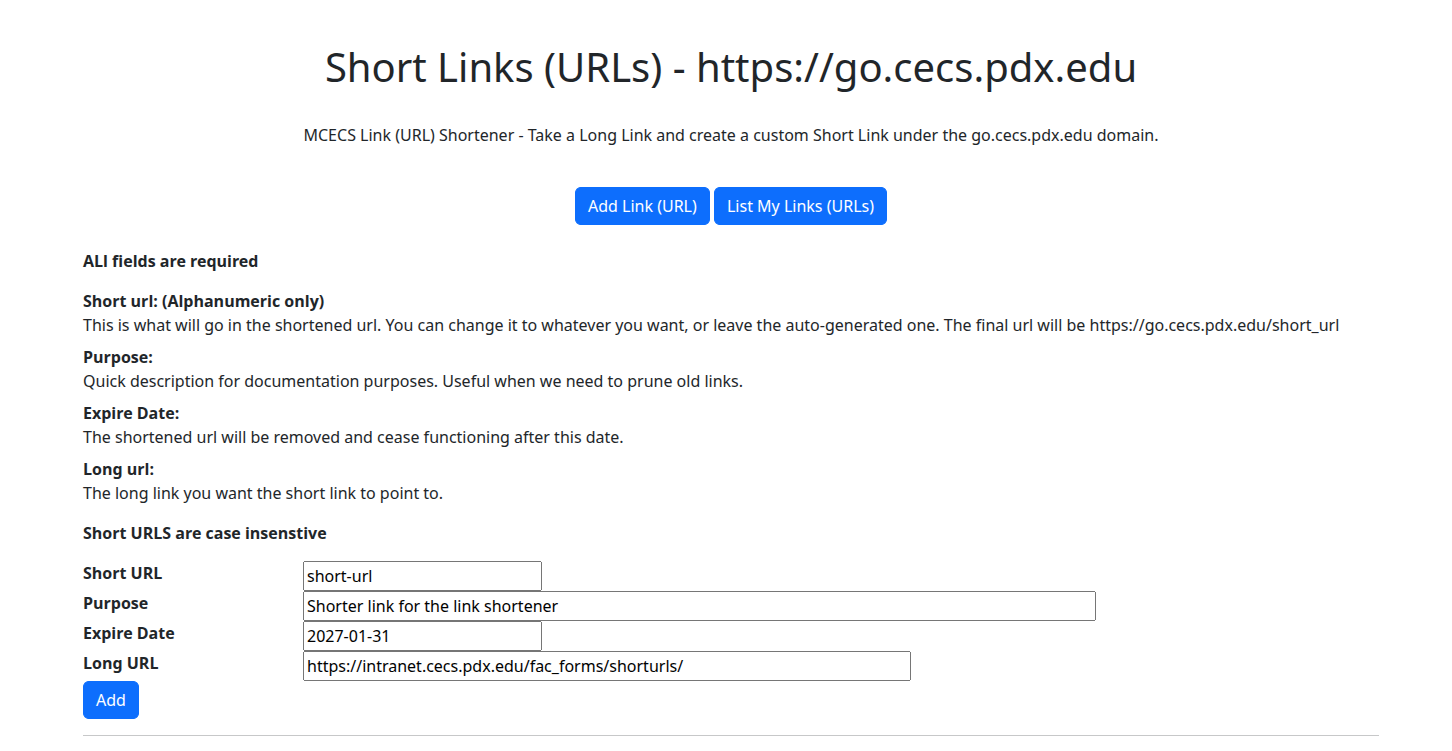
To shorten the link https://intranet.cecs.pdx.edu/fac_forms/shorturls/ into https://go.cecs.pdx.edu/short-url until January 31, 2027, you would enter:
| Short URL | short-url |
| Purpose | Shorter link for the link shortener |
| Expire Date | 2027-01-31 |
| Long URL | https://intranet.cecs.pdx.edu/fac_forms/shorturls/ |
and then click Add. The URL https://go.cecs.pdx.edu/short-url will now redirect to https://intranet.cecs.pdx.edu/fac_forms/shorturls/.
Test this by clicking the following link: https://go.cecs.pdx.edu/short-url
Viewing and Editing Shortened Links
To view shortened links that you have generated, click List My Links (URLs). This will show you a list of your shortened links. Remember that whatever the Short URL is listed as is what goes after https://go.cecs.pdx.edu/. From here, you can delete or edit your shortened links.